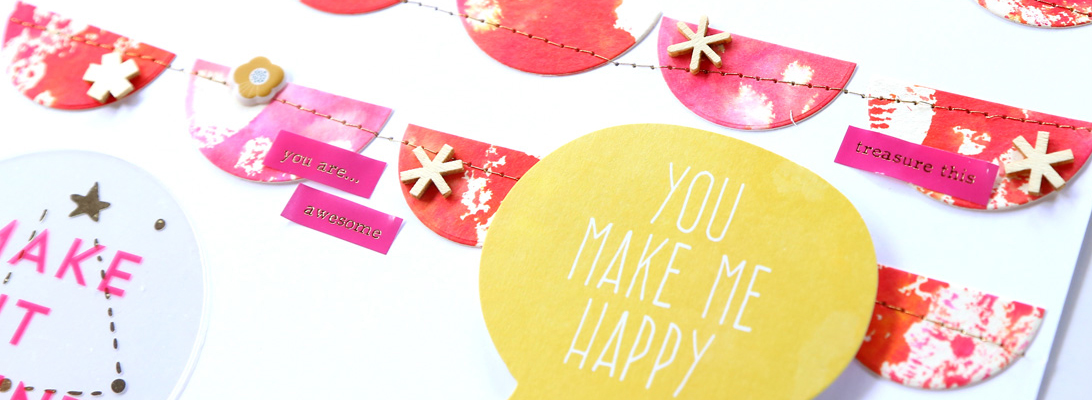
I must share a project I recently made with a great hybrid template by Simply J Studio and some of the ScrapMatters September Mix-a-Kit. I love how it turned out!
I’m going to burn a DVD with photos of this year to go in it. 🙂
I must share a project I recently made with a great hybrid template by Simply J Studio and some of the ScrapMatters September Mix-a-Kit. I love how it turned out!
I’m going to burn a DVD with photos of this year to go in it. 🙂
I haven’t posted my P52 Cards pictures in quite a while now! Here’s the ones for the past few weeks, including the latest from today.
You can see the Week 39 card here.
You can see the Week 40 card here.
You can see the Week 41 card here.
You can see the Week 42 card here.
You can see the Week 43 card here.
Wow, less than 10 weeks to the end of the year!
I have something very, very special to share today. The designers at The Lilypad have put together an amazing collaboration kit for a very sweet girl, Melissa, who is on the CT at The Lilypad and is fighting hard against ovarian cancer. I did not know Melissa prior to joining the CT, but by checking out her blog I soon found out what a special person she is. And this kit is in honor of Melissa; all proceeds from the sale will go to her and her family as they keep fighting this battle.
The kit is gorgeous, truly gorgeous, and it is special in so many ways. So if you buy just one kit this week – heck, if you buy just one kit this month! – let this be it.
I can see myself scrapping many, many page with this kit – it’s so big and versatile! Here are two pages I’ve made so far:
Incidentally, these are the first photos I edited with RadLab and scrapped – love them!
I have more great news, and another page to share. It’s time for the quarterly 30% off sale at The Lilypad, so make sure you take advantage of it this weekend!
I used this gorgeous new kit by Jenna Desai and Micheline Martin:
to scrap this page:
Sigh. I’ve scrapped that photo before, but lately DH has been particularly reluctant in taking pictures. I will force him to take a few this weekend, so I can swap the new photo in this page. 🙂
****************************************
Keep scrolling for the Hopping Halloween blog hop!
****************************************
I am dying to share this project! I did it last night and I’m so happy with how it turned out!! 🙂 Ju Kneipp and Tangie Baxter have teamed up to create a fantastic kit out today at Oscraps:
I used it to make a frame with collage houses and I am SO excited about how this project turned out!
Here are some details. The house on the left is all digi – it’s an element made by Tangie. And it inspired me to create my own collage houses. I had so much fun with this project! 😉
****************************************
Keep scrolling for the Hopping Halloween blog hop!
****************************************
Mari Koegelenberg has a great collection out today! It’s 20% off throughout the weekend!
This kit is perfect to scrap little boys, but it was great to scrap my train ride with my mom too!
Make sure to stop by tomorrow, I have something super special to share!
****************************************
Keep scrolling for the Hopping Halloween blog hop!
****************************************
This week the 50% SOSN sale at The Lilypad is especially tempting! There are lots of products too good to pass! Here are a few I have used:
and here are the pages I did:
I’m trying really hard to finish scrapping all the pictures from my mom’s visit in spring before she comes to visit again next month, otherwise I know they’ll never get scrapped! I have been making slow and constant progress, but this is going to be a huuuge album! I’m at about 45 pages scrapped, and I will have to do at least 10 more. Help! 🙂
****************************************
Keep scrolling for the Hopping Halloween blog hop!
****************************************
With all the excitement for the Halloween Bash at The Lilypad this past weekend, I forgot to post a new card I did with lots of Sahlin Studio goodies, including some new releases and some October BYOC products.
How gorgeous are they?! 😉 Here is my card:
What better kit for a blog hop that the awesome Hopping Halloween by the designers from The Lilypad and Oscraps? 😉 The collab is on sale this weekend, so make sure to grab it now!
My favorite Halloween picture is one from kindergarten. I was dressed up as a witch, and my mom had made me a lovely lil’ broom. So I scrapped this page with it:
and I turned this into a quick page for you all to have! I hope you like it! Make sure to leave me a comment if you download. 🙂 ETA Nov. 5 – thanks for your interest, the freebie has expired.
Now, it’s time to head over to the next spooky fabulous stop of the blog hop, Diane’s blog. If you get lost, head back to the blog at Oscraps and keep in mind the blog is scheduled to go live on Saturday, so be patient if not all the links are there. And have fun! 🙂
Stop by the forum at The Lilypad for fun games and prizes!
For the past couple of weeks, I’ve been talking DH into letting me buy RadLab. Why? Well, here’s my thought. I dislike photo editing. I have a bunch of free photo actions installed in my Photoshop, but end up running the same 2-3 all the time. I thoroughly hate having to run an action to know what it will look like, just to end up not liking it 95% of the time. It is such a huge loss of time. So when I heard about the new product by Totally Rad, RadLab, I immediately thought it was made for me: instead of running actions, you apply stylets to the photos. Technicalities aside, the point is that you get an instant preview of what your photo will look like, without having to wait for any action to run! Magic!! And the interface is really cool and easy to use. Anyway, the price is pretty steep for me (especially since I just confessed I don’t like to edit photos… 😉 ), so I’ve just been dreaming about it for a while. But then the people at Totally Rad (I guess the name didn’t come out of nowhere, huh? 😉 ) put out a 30-day trial of RadLab, so I went and installed it. It really is magic like it sounds. Here is the first example I ran. I started with a very crappy photo DH took of me last Halloween.
Yak. I just played around with the ‘actions’ I liked the most, and ended up with this:
Now, if I were to show it to DH, I’m sure he’d say that it looks a bit yellow. 😉 He’s unartistic like that. Umpf! 🙂 Honestly, though, I have never received so many comments in the gallery for my photo processing. Here are some of the comments I got in the galleries for this LO: “LOVE the effect on the photos – makes them look kinda spooky :)”; “[…] great photo effects too”, “This is beautiful! I love the edit on the photos! Great choice for the background paper.”; “This is awesome!!! Love the photo, love the patterned paper!”
Here’s the close up:
OK, let’s look at another example. It’s yet another horrendous photo of me taken by DH. Last year he botched all of the photos of my birthday, but I really wanted to salvage this one.
A few months back, I used a mish mash of actions to produce this result, of which I was (and still am) very proud:
Now, playing with RadLab, I came up with this instead:
Here are the close ups. Before (clearly! 😉 ):
After bunch of actions:
After RadLab:
The result is clearly over-processed to compensate for the awful picture (in fact there is plenty of color noise, especially on the dress, and what not), but I think I do prefer the RadLab result.What do you think? I asked DH and he also likes the RadLab edit best.
Speaking of crappy pictures, I also edited one of the pictures my mom took with her point-and-shoot during out train trip last May. Here’s the before:
And the after:
Pretty cool, huh?
As a last example, here’s how I edited a photo that was already pretty good. Before:
And after:
In conclusion, I have to say after just a few days of using it, I am totally sold on RadLab. The price is a bit high for my pocket, though, so I am hoping to score a Black Friday sale or something (fingers crossed!)…